
Amazon A+ Content banners: size, price and process
A+ Content is the extra section of images and text that appears on your book's Amazon product page, under "From the Publisher". Ebook Launch designs two A+ Content banners adapted from the cover we designed for you: a 1940 x 600 pixel top banner and a 1940 x 600 pixel banner of three squares. They cost $75 USD, and we send them within 7 business days.
What is A+ Content?
A+ Content is an Amazon KDP feature that lets authors add images, text and comparison tables to their book's detail page. It appears under the "From the Publisher" section, where readers scroll down after the book description. Well-designed banners make the page look professional and carry the look of your cover further down the page.
What is included?
Two JPG banners, both adapted from your approved book cover:
- Top banner: a wide banner adapted from the cover artwork.
- Bottom banner: a banner divided into three squares, each of which can feature a different image or quote.
Unless you tell us otherwise, the three squares show:
- Left square: your book title, adapted from the cover.
- Middle square: a quote or endorsement you provide. Amazon does not allow customer reviews in A+ Content, and only allows quotes from well-known publications or public figures, with the source named.
- Right square: a 3D mockup of your book on a background sampled from the cover.
Files are delivered by email.
Here is an example of A+ Content banners adapted from a book cover:

Ebook cover

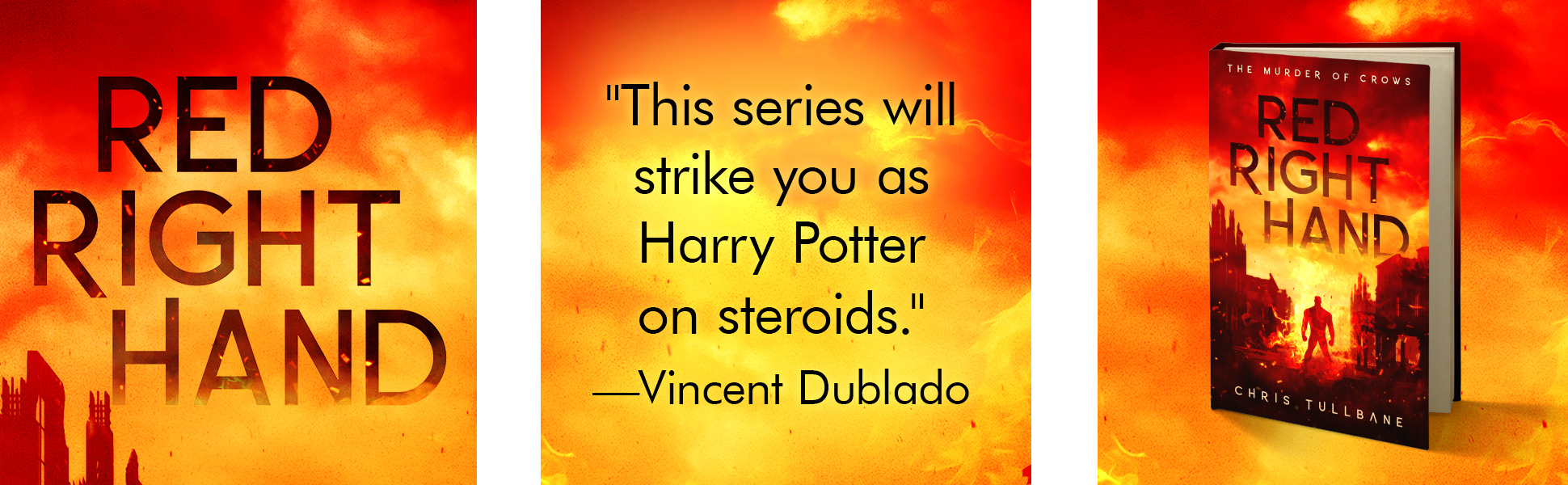
A+ Content banners
How much do A+ Content banners cost?
A+ Content banners cost $75 USD for the pair. They are an add-on for covers designed by Ebook Launch. See How much does book cover design cost? for all our prices.
What size are the banners?
- File type: two JPGs
- Dimensions: 1940 x 600 pixels for each banner
- File size: about 1 MB each
- Colour profile: RGB
- Resolution: 72 DPI
1940 x 600 pixels is the size Amazon suggests for its "Standard Image & Text Overlay" module, and the files are within Amazon's 2 MB limit. See Amazon's A+ Content module examples.
How do I order?
You can order A+ Content banners in two ways:
- With your book cover design, on the order form.
- Later, on our cover design extras form, once we have designed your book cover.
How does the design process work?
- We start once we have an approved book cover design to work from.
- We adapt the banners from your cover and ask you for the quote or endorsement for the middle square.
- You review the banners for any errors. We fix any changes at this stage free of charge. Let us know when you approve them.
- Once you approve, we send any final files and instructions, and the project is complete.
How long does it take?
- Ordered after your book cover was finished: we send the banners within 7 business days of payment of the invoice.
- Ordered with your book cover: we send them within 7 business days of your approval of the book cover.
How do I add the banners to Amazon?
You add the banners to your book's page in A+ Content Manager, found on the Marketing page of your KDP account. Amazon reviews A+ Content before it appears, usually within 8 business days, and emails you if anything needs changing. Amazon's A+ Content guidelines list what is allowed.
Can I make changes later?
All revisions while the project is active are free of charge. If you would like changes after you have approved the banners, email us and we will send a quote based on the complexity of the request.
Related articles
- Ebook cover design: price, what's included and process
- Audiobook cover design: size, price and process
- Cover design policies: rights, stock images, payment and refunds
If anything is missing or unclear, please contact us.